
Wanhang专注散热风扇生产厂家


4News -> Company
Ordinary home environment: Once every 6 to 8 months
Dusty / cat-owning / factory workshop environment: Once every 3 months
24/7 gaming / rendering / crypto mining scenarios: Once every 2 months
Correct Operation Steps
Power off the device, unplug the graphics card, remove the cooling module, and disassemble the fan separately;
Use a soft brush to sweep loose surface dust off the fan blades, frame and cooling fins; For stubborn accumulated dust, use a low-pressure air blower with cold air for purging — hot air is strictly prohibited (it will cause plastic fan blades to deform under heat and volatilize bearing lubricating grease);
For oil stains and sticky dust, use a lint-free cloth dipped in a small amount of anhydrous alcohol to gently wipe the fan blades, and fully air-dry the components before reinstallation;
Clean dust in the gaps of cooling fins with a toothbrush paired with an air blower, to avoid accumulated dust blocking airflow and causing the fan to run at high speed for a long time;
Install dust filters on the front / side air inlets of the chassis to reduce continuous dust inhalation into the fan interior.
Prohibited Operations
Do not use a high-pressure air gun to directly blow the bearing at close range, as this will blow away the internal lubricating grease, accelerating abnormal noise and permanent failure.
1. Sleeve Bearing Fan
Maintenance interval: Refill lubricant once every 10 to 12 months
Operation: Tear off the circular dust-proof sticker on the back of the fan, drip 1 to 2 drops of watch oil / special fan lubricant onto the bearing shaft (engine oil and edible oil are forbidden, as their high viscosity will easily cause dust accumulation and caking); After dripping, let it stand for a few minutes and rotate the fan blades to allow the oil to fully penetrate, then reattach the dust-proof adhesive sticker tightly.
Aging threshold: It is recommended to replace the fan directly after 2 years of use, as lubricant refilling only temporarily relieves abnormal noise.
2. FDB Fluid Dynamic Bearing
Comes with a built-in circulating oil groove for low wear rate
Maintenance interval: Lubricant refilling is only required once every 2 to 3 years;
Advantages: No frequent oil refilling is needed under normal cleaning conditions, the internal grease is not easy to volatilize at high temperatures, making it the longest-lasting bearing for consumer-grade applications.
3. Dual Ball Bearing
Adopts solid lubricating grease inside the balls, almost no frequent refilling required
Maintenance interval: Inspect once every 3 years, and add a small amount of special lubricating grease only when granular metal friction abnormal noise occurs;
Note: Do not add thin liquid oil, as it will dilute the original solid lubricating grease.
Check the four silicone damping gaskets every time you disassemble and assemble the fan, replace them immediately if they fall off, harden or crack;
Tighten the fan fixing screws evenly, do not apply force on a single side to deform the frame;
Recheck the radiator screws regularly to avoid loosening and resonance that causes continuous fan shaking;
Do not let the chassis side panel cling to the graphics card fan, reserve ventilation gaps to prevent airflow impact that generates resonance noise.
Enable the GPU ZeroFan function — the fan will completely stop running at low idle temperatures, greatly reducing wear;
Customize the fan curve via the graphics card control panel (MSI Afterburner / ASUS GPU Tweak):
Run at low speed / stop operation when the temperature is below 55°C;
Raise the speed only under high load and high temperature conditions, to avoid long-term medium-high speed no-load operation;
Do not manually lock the fan to 100% full-speed operation for a long time.
Ensure a reasonable airflow path for the chassis: front air intake, rear air exhaust, to avoid hot air backflow that directly blows onto the graphics card;
Do not block the upper and lower ventilation spaces of the graphics card, and do not stack cables to cover the cooling fins;
Replace the thermal conductive silicone grease once every 1 to 2 years — reduced GPU heat dissipation efficiency will force the fan to run at high speed for a long time;
When the ambient temperature is high in summer, appropriately lower the indoor temperature to avoid the fan being continuously baked by high temperature from the graphics card.
Avoid frequent drastic temperature changes: Shutting down immediately after long-term full load will cause the high-temperature bearing to cool sharply, leading to lubricating grease deterioration; Let the device run at no load for a few minutes after high load before powering off;
In humid environments (plum rain season in southern China): Long-term shutdown will easily cause internal bearing oxidation and rust, power on the device for 10 minutes every week to dry out internal moisture;
Avoid placing the chassis horizontally or upside down: Long-term unbalanced gravity pressure on the bearing will aggravate unilateral wear.
Rotate the fan blades by hand to check if the operation is smooth, without jamming or granular friction noise;
Check if the edges of the fan blades are out of balance due to accumulated dust, or have slight deformation;
Inspect the 4-PWM cable for wear and tension, to avoid unstable power supply that causes frequent fan start-stop and impacts the motor.
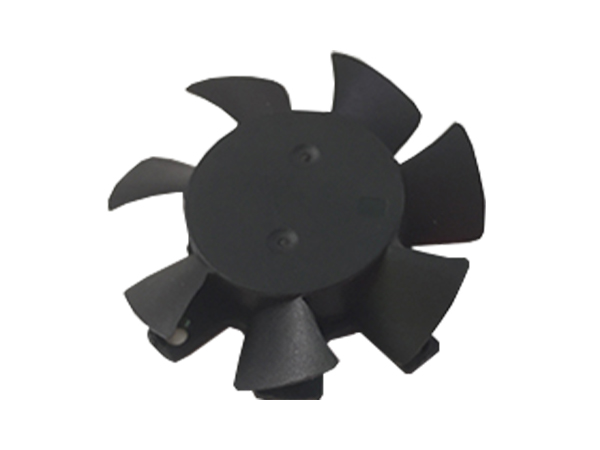
Graphics Card Cooling Fan is the core of GPU air cooling solutions, divided into two major categories: axial fans (direct-blow type) and turbine blowers (reference closed-loop type). Equipped with 4-Pin PWM temperature-controlled speed regulation, it is responsible for dissipating heat from heat pipes and cooling fins, directly determining the gaming operating temperature, noise level, and service life of the graphics card.
I. Regular Dust Removal
Interval StandardsOrdinary home environment: Once every 6 to 8 months
Dusty / cat-owning / factory workshop environment: Once every 3 months
24/7 gaming / rendering / crypto mining scenarios: Once every 2 months
Correct Operation Steps
Power off the device, unplug the graphics card, remove the cooling module, and disassemble the fan separately;
Use a soft brush to sweep loose surface dust off the fan blades, frame and cooling fins; For stubborn accumulated dust, use a low-pressure air blower with cold air for purging — hot air is strictly prohibited (it will cause plastic fan blades to deform under heat and volatilize bearing lubricating grease);
For oil stains and sticky dust, use a lint-free cloth dipped in a small amount of anhydrous alcohol to gently wipe the fan blades, and fully air-dry the components before reinstallation;
Clean dust in the gaps of cooling fins with a toothbrush paired with an air blower, to avoid accumulated dust blocking airflow and causing the fan to run at high speed for a long time;
Install dust filters on the front / side air inlets of the chassis to reduce continuous dust inhalation into the fan interior.
Prohibited Operations
Do not use a high-pressure air gun to directly blow the bearing at close range, as this will blow away the internal lubricating grease, accelerating abnormal noise and permanent failure.
II. Targeted Regular Lubrication Maintenance by Bearing Type
1. Sleeve Bearing Fan
Maintenance interval: Refill lubricant once every 10 to 12 months
Operation: Tear off the circular dust-proof sticker on the back of the fan, drip 1 to 2 drops of watch oil / special fan lubricant onto the bearing shaft (engine oil and edible oil are forbidden, as their high viscosity will easily cause dust accumulation and caking); After dripping, let it stand for a few minutes and rotate the fan blades to allow the oil to fully penetrate, then reattach the dust-proof adhesive sticker tightly.
Aging threshold: It is recommended to replace the fan directly after 2 years of use, as lubricant refilling only temporarily relieves abnormal noise.
2. FDB Fluid Dynamic Bearing
Comes with a built-in circulating oil groove for low wear rate
Maintenance interval: Lubricant refilling is only required once every 2 to 3 years;
Advantages: No frequent oil refilling is needed under normal cleaning conditions, the internal grease is not easy to volatilize at high temperatures, making it the longest-lasting bearing for consumer-grade applications.
3. Dual Ball Bearing
Adopts solid lubricating grease inside the balls, almost no frequent refilling required
Maintenance interval: Inspect once every 3 years, and add a small amount of special lubricating grease only when granular metal friction abnormal noise occurs;
Note: Do not add thin liquid oil, as it will dilute the original solid lubricating grease.
III. Vibration Damping Maintenance to Reduce Wear from Friction
Vibration will accelerate the expansion of bearing clearance, cause dynamic balance failure of fan blades, and lead to premature aging:Check the four silicone damping gaskets every time you disassemble and assemble the fan, replace them immediately if they fall off, harden or crack;
Tighten the fan fixing screws evenly, do not apply force on a single side to deform the frame;
Recheck the radiator screws regularly to avoid loosening and resonance that causes continuous fan shaking;
Do not let the chassis side panel cling to the graphics card fan, reserve ventilation gaps to prevent airflow impact that generates resonance noise.
IV. Optimize Fan Speed and Temperature Control to Reduce Continuous Wear
Long-term full-speed operation is the top cause of rapid bearing aging:Enable the GPU ZeroFan function — the fan will completely stop running at low idle temperatures, greatly reducing wear;
Customize the fan curve via the graphics card control panel (MSI Afterburner / ASUS GPU Tweak):
Run at low speed / stop operation when the temperature is below 55°C;
Raise the speed only under high load and high temperature conditions, to avoid long-term medium-high speed no-load operation;
Do not manually lock the fan to 100% full-speed operation for a long time.
V. Optimize Chassis Airflow to Reduce High-Temperature Operation of the Fan
High temperature will quickly dry out the bearing lubricating grease, cutting the service life in half:Ensure a reasonable airflow path for the chassis: front air intake, rear air exhaust, to avoid hot air backflow that directly blows onto the graphics card;
Do not block the upper and lower ventilation spaces of the graphics card, and do not stack cables to cover the cooling fins;
Replace the thermal conductive silicone grease once every 1 to 2 years — reduced GPU heat dissipation efficiency will force the fan to run at high speed for a long time;
When the ambient temperature is high in summer, appropriately lower the indoor temperature to avoid the fan being continuously baked by high temperature from the graphics card.
VI. Correct Usage Habits to Avoid Common Pitfalls
Do not let foreign objects touch the running fan blades: Cables, screwdrivers or fingers hitting the blades will cause dynamic balance deviation and permanent abnormal noise;Avoid frequent drastic temperature changes: Shutting down immediately after long-term full load will cause the high-temperature bearing to cool sharply, leading to lubricating grease deterioration; Let the device run at no load for a few minutes after high load before powering off;
In humid environments (plum rain season in southern China): Long-term shutdown will easily cause internal bearing oxidation and rust, power on the device for 10 minutes every week to dry out internal moisture;
Avoid placing the chassis horizontally or upside down: Long-term unbalanced gravity pressure on the bearing will aggravate unilateral wear.
VII. Regular Basic Inspection to Predict Failures in Advance
Check the following 3 items every time you perform dust removal, to achieve proactive maintenance instead of emergency fan replacement:Rotate the fan blades by hand to check if the operation is smooth, without jamming or granular friction noise;
Check if the edges of the fan blades are out of balance due to accumulated dust, or have slight deformation;
Inspect the 4-PWM cable for wear and tension, to avoid unstable power supply that causes frequent fan start-stop and impacts the motor.


-
About
Company Profile Corporate Culture Corporate Image Honors & Certifications Partners Video Center -
Product
Axial Fan Blower Fan Graphics Card Fan Heat Sink Module AC Fan More>> -
Solutions
Consumer Electronics Communication Equipment Industrial Control New Energy Equipment Home Appliance Applications Automotive Electronics LED & Lighting Medical Devices -
News
Company Industry FAQ -
Contact Us
Contact Information
Dongguan Wanhang Electronic Technology Co., Ltd. 【Admin】
-
Hotline
+86 139 2557 5658
Consultation Hotline (Mr. Cai)
-
Consult
-

TOP